

Don’t Miss Out:
Upgrade Your Setup for GTA 6
The gear that actually matters for next-gen open-world gaming
GTA 6 will push consoles, displays, storage and audio harder than most games. Here’s a clear guide to the upgrades that deliver real performance, immersion and day-one readiness — without wasting money.
Why Your Current Setup Might Struggle
GTA 6 is built for next-generation hardware. Expect a massive open world, denser cities, better physics, higher resolution targets and heavier streaming of assets. Older storage, 60Hz screens, weak Wi-Fi or basic audio will hold back the experience even if your console is “fine.”
This guide focuses on the 8 categories that matter most — console, display, controller, headset, storage, chair, RGB accessories and internet — so you upgrade in the right order and get the biggest impact for your money.
1. Console
The foundation. Choose the platform you’ll play on day one.
PlayStation 5 / PS5 Pro & Xbox Series X
Best for GTA 6 — next-gen performance

PS5 Slim / PS5 Pro and Xbox Series X are the clear choices. Both deliver the CPU, GPU and fast SSD GTA 6 is designed around. The Pro version adds higher fidelity and frame-rate options if you want maximum visual quality.

Xbox Series X remains excellent for 4K performance and Game Pass. Pick the ecosystem you already use (friends, exclusives, subscriptions).
- Next-gen CPU/GPU built for large open worlds
- Ultra-fast internal SSD for streaming city assets
- 4K and high frame-rate support
2. 4K Display
Where you actually see the world. 120Hz + HDR makes a huge difference.
4K HDR TV or 27–32″ 4K 120Hz Monitor
120Hz + HDR for smooth, sharp gameplay

A 4K 120Hz display with HDR is one of the highest-impact upgrades. Motion stays clear in chases and gunfights, and HDR brings out neon nights, sunsets and weather in Vice City-style environments.
- 4K resolution for sharp detail
- 120Hz for smoother camera and action
- HDR for brighter highlights and deeper contrast
- HDMI 2.1 recommended for full console features
3. Controller
Immersive controls — haptics, adaptive triggers and precision.
DualSense / DualSense Edge & Xbox Elite Series 2
Immersive controls for long sessions
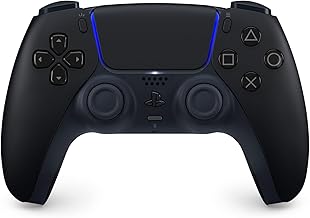
DualSense haptic feedback and adaptive triggers make driving, shooting and explosions feel physical. The DualSense Edge adds remappable buttons and longer battery for serious play.

Xbox Elite Series 2 is the pro choice on Xbox — adjustable sticks, paddles and a premium feel for long sessions.
- Haptics and adaptive triggers (PS5)
- Paddles and customization (Elite / Edge)
- Better comfort for multi-hour sessions
4. Gaming Headset
Spatial audio turns the city into a living soundscape.
SteelSeries Arctis Nova / HyperX Cloud III / Razer BlackShark
Spatial audio for max immersion
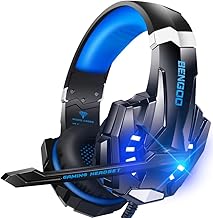
A good headset lets you hear footsteps, distant traffic, radio chatter and directional gunfire. SteelSeries Arctis Nova, HyperX Cloud III and Razer BlackShark V2 Pro all deliver clear spatial audio and comfort for long sessions.
- Clear directional / spatial audio
- Comfortable for multi-hour play
- Reliable mic for party chat
5. Storage Upgrade
GTA 6 will be huge. Fast SSD space is non-negotiable.
Internal NVMe SSD & External / Expansion Options
More space + faster load times

Samsung 990 Pro and WD_BLACK SN850X are proven high-speed NVMe options for PS5 expansion (with heatsink). On Xbox, the official Seagate Storage Expansion Card or compatible external SSDs keep load times low.

Don’t rely on slow external HDDs for the main game install — you’ll feel the difference in streaming and load times.
- High-speed NVMe for console expansion
- Enough capacity for GTA 6 + other large titles
- Faster installs and less stutter from asset streaming
6. Gaming Chair
Long sessions need real support — not just “looks cool.”
Ergonomic Gaming Chair
Comfort & posture for long sessions

GTA 6 sessions can run for hours. A chair with proper lumbar support, adjustable height and solid build reduces fatigue and back pain so you can actually enjoy the game instead of shifting every 20 minutes.
- Lumbar and back support
- Adjustable height and armrests
- Built for multi-hour use
7. RGB Accessories
Finish the setup — keyboard, mouse, lighting.
Mechanical Keyboard, Gaming Mouse & Desk Lighting
Complete the look and feel

RGB doesn’t improve frame rates — but a solid mechanical keyboard, responsive mouse and simple desk lighting make the whole setup feel finished and more enjoyable for long nights in-game or streaming.
- Mechanical keyboard for better feedback
- Gaming mouse with solid sensor
- Desk / bias lighting for less eye strain
8. Internet
Stable connection for downloads, multiplayer and updates.
Wi-Fi 6 / 6E / 7 Router or Ethernet
Fast downloads & low-lag play

GTA 6 will be a large download and will need a stable connection for online features and updates. A modern Wi-Fi 6 / 6E / 7 router — or a simple Ethernet cable — cuts lag and failed downloads.
- Faster game downloads and updates
- More stable multiplayer connection
- Less congestion if others use the network
Quick Buying Tips
Fix the Bottleneck
Upgrade what limits you first — storage, display or internet
Prioritize Display & Audio
These deliver the biggest immersion jump in GTA 6
Don’t Overspend Early
Essentials first. RGB and extras can wait
Watch Major Sales
Black Friday, Cyber Monday & seasonal deals save big
Build Smart, Play Better
You don’t need every accessory on day one. Start with console + display + storage + solid audio. Add controller upgrades, chair and lighting as your sessions get longer. That’s how you stay ready for GTA 6 without wasting money.
“Be ready. Play day 1. Play epic.”
— Upgrade the parts that actually change the experienceThis guide contains affiliate links. Purchases may earn a commission at no extra cost to you.
Not affiliated with Rockstar Games. Product recommendations are based on widely recognized gaming hardware for modern AAA games.
Drop your signal
No Blogger chrome. Just you and the thread.